

Send an RFQ in your own file
Upload the enquiry as it leaves your system — Excel (xlsx, xls), CSV or PDF, up to 10 MB. You get our RFQ number at once and can see when we have picked it up. Our answer comes back to the same page.
RFQ Radar is the client portal of MG AVIATION TECH. Buyers at airlines, MRO shops and aircraft operators use it to send us RFQs in their own files, see every line priced with condition, certification and lead time, place the order, and keep track of invoices — without digging through email threads to find out where things stand.
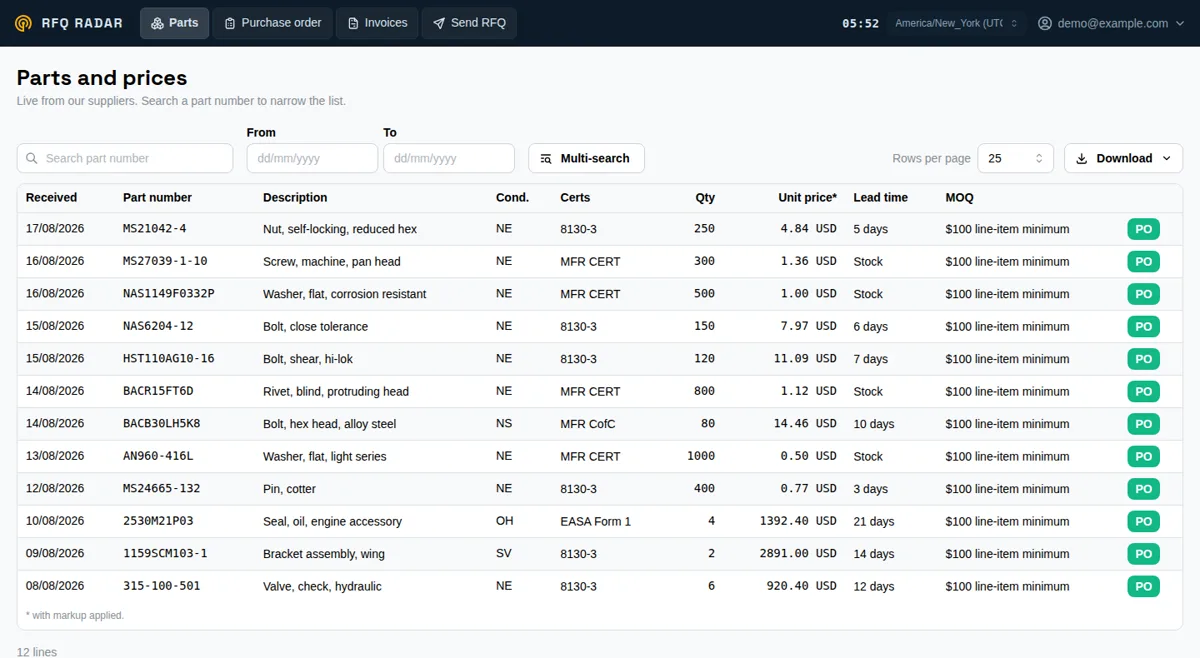
An RFQ for aircraft parts rarely gets one clean answer. Quotes come back in different formats, split across emails; one supplier offers overhauled, another new surplus, a third leaves out the certificate. To see which condition was actually offered for which line, what the lead time is and whether a certificate comes with it, someone re-keys it all into a spreadsheet. Then the order goes out, and the status is whatever the last email said.
RFQ Radar keeps that in one place. You send the RFQ the way you already write it, we answer every line in the same shape, and the order, our reply to it and the invoices live next to the quote they came from.
Upload the enquiry as it leaves your system — Excel (xlsx, xls), CSV or PDF, up to 10 MB. You get our RFQ number at once and can see when we have picked it up. Our answer comes back to the same page.
Part number, description, condition (NE, NS, OH, SV, AR and others), certificates, quantity, unit price in US dollars, lead time in days, minimum order and the country the part ships from. Search by part number, sort, and download the list to Excel or CSV.
Put lines on a purchase order, set the quantity, tick the lines you need a certificate for and leave us a note. Our reply to the order comes back in the portal, and you accept it or tell us what does not work. The order is kept as a PDF, with the lead time of every line.
Invoices show what is due and what we have already received. Several invoices can be put on one group invoice, so you pay them in a single transfer.
We can switch on a chat with our team for your company: ask about a quote, an order or a delivery, and the answer stays next to your work instead of in someone's inbox.
The portal is there to save you time, not to add a step. If your RFQs leave your system as an email with a spreadsheet, a PDF or a scan attached — five lines or five hundred — send them to [email protected] as they are. No form, no re-keying into our format.
Every login belongs to one company. Your RFQs, orders, invoices and chat are visible to your company only, and the prices you see are the prices set for your company.
Show us a real RFQ of yours, and in fifteen minutes you will see how it comes back answered line by line. Already a customer? Ask your MG AVIATION TECH contact to open accounts for your buyers.